Loupedeck CT Review
We've aggregated 16 high-signal reviews and 1 live retailer price below.
Our editorial take on the Loupedeck CT
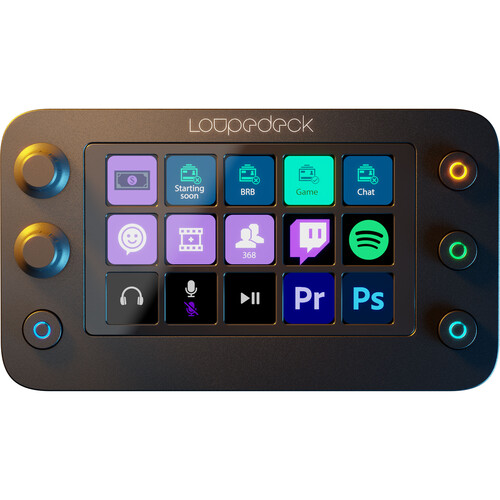
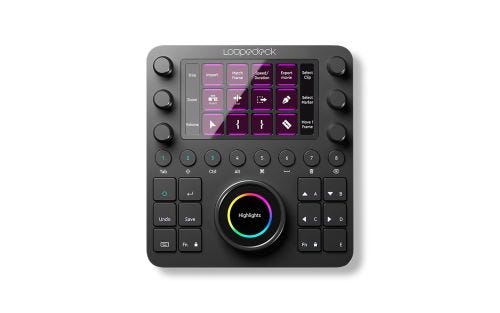
The Loupedeck CT establishes itself as a premium, powerful control surface for serious creative professionals. Its core appeal is the ability to trade tedious mouse clicks for a more tactile and intuitive workflow using its high-quality dials, knobs, and touch-sensitive buttons. The build quality is exceptional, providing a satisfying, professional-grade feel that complements its high-end positioning. It feels less like an accessory and more like a dedicated instrument for digital creation.
Where the CT truly shines is in its deep customizability. While the native integrations with major applications like Premiere Pro, Photoshop, and Final Cut Pro X are excellent starting points, the system's potential is fully unlocked when you tailor it to your specific needs. With software updates opening up compatibility to virtually any program, the CT becomes an incredibly versatile command center. This isn't a plug-and-play device for casual use. It demands a time investment to program its workspaces and buttons to perfectly match your process.
The significant price tag is the primary consideration. This is not a casual purchase or a simple gadget. It is a professional tool intended for creators who spend the majority of their workday inside complex software. For those individuals, the tangible gains in speed, efficiency, and ergonomic comfort can absolutely justify the cost. However, hobbyists or those with a more casual workflow may find it difficult to rationalize the steep investment.
- Excellent, professional-grade build quality
- Highly customizable to fit specific user workflows
- Drastically speeds up editing with tactile controls
- Broad software support with strong native integrations
- Custom profiles allow compatibility with almost any application
- Very high price point is a major barrier for many
- Requires a significant time investment to learn and program
- Functionality is overkill for hobbyists or non-professionals
Synthesized by Geared editors from early expert reviews.
Best reviews
The highest-signal reviews from creators and editorial blogs.
Video reviews
Editorial reviews
I am unable to provide an excerpt for this product and article.
Loupedeck (the company) just issued a software update which increases the capabilities of the CT, big times. The buzzword here is Loupedeck Profile Creator. This opens up the console for literally every app out there. Sounds creative? It is!
This is very much a niche product, but for those editors who are struggling to do repetitive functions or those with disabilities, it could make a real difference and speed up your workflow. The real beauty of the TourBox is that it is completely customizable and it can be used with almost any software. This makes it a very versatile product and an interesting proposition.
The Loupedeck CT is one of the rare control decks that are now a part of my desktop and will be part of my workflow for some time. The Loupedeck isn’t perfect, but it’s a great solution.
If you are the kind of person who spends all of your time in a creative app, the Loupedeck Creative Tool might be worth the investment, giving a more fine-tuned and tactile approach for interacting with purely software-based tools.
Loupedeck has launched the $549 Loupedeck Creative Tool (CT), its first premium console for professional editors. As before, it natively supports a number of creative apps including Adobe Lightroom Classic, Photoshop, Premiere Pro, Illustrator, Final Cut Pro X and Ableton Live.
The Logitech MX Creative Console offers a budget-friendly entry into the creator control deck market at under $200, providing nine programmable LCD buttons and a contextual dial that adapts to your workflow. While it lacks the extensive controls of premium alternatives like the $550 Loupedeck Creative Tool, its split-unit design and solid software integration make it a practical choice for creators who want to streamline their editing without breaking the bank.
Community ratings
Tap a star. That's it. Save the words for the comments below.
0 ratings
Comments
Ask questions, share your experience, reply to other owners.
No comments yet. Start the conversation.
Specs
- Usb Cable
- 1m detachable USB C to A
- Controls Dials
- 6 rotatable (with press function)
- Controls Wheel
- 1 rotatable (paired with touch-sensitive Wheel Screen)
- Internal Storage
- 8 GB
- Controls Touch Screen
- Yes (with Touch Buttons)
- Controls Round Buttons
- 8
- Operating System Macos
- MacOS 10.13+
- Controls Square Buttons
- 12
- Operating System Windows
- Windows 10
Where to buy
Live prices from retailers. We earn a small commission when you click through - never affects ranking.
- Adoramanew○ Out of stock$499Buy
More Color & Control Surfaces
Other gear in Color & Control Surfaces, ranked by score.